End-to-end tests are brittle by nature—they run against real browsers, real devices, and real networks, so the same test can pass, stall, or fail for reasons that have nothing to do with your code. The slow part of QA isn't writing tests; it's figuring out what happened when one misbehaves—and historically that meant waiting: read the logs, or watch the recorded video after the run finished.
Being able to live stream a run in progress is a huge quality of life improvement for any tester — and critical for having AI intervene during a test to clear the causes of flakes. The human or agent can kill a hung flow that's burning toward a timeout, or confirm a flaky fix in real time. And it’s something only QA Wolf offers.
To do it, we had to become a low-latency streaming company like Google Meet, Zoom, or Twitch. In fact, we built our solution on the same streaming protocol they use, WebRTC.
But we had to do it under constraints those companies never face:
- We pay the encode bill, at fleet scale. In a video call there's one stream per person, and the user's device encodes it. We run thousands of runs in parallel and every stream is encoded on our infrastructure—so a per-stream cost that's invisible to Zoom gets multiplied across tens of thousands of runs per month.
- Three headless sources that share no code. There's no webcam and no human here. Our "sender" is a Linux container's display, an Android VM, or a real iPhone—three completely different capture mechanisms that all have to look identical to one client.
- Nobody to click "reconnect." The sending side is an unattended runner. Recovery, reconnection, and graceful failure all have to be automatic, because there's no person on the other end to retry.
- It has to stream and record at once. A video call is ephemeral—you watch, and it's gone. Every run we stream live also has to be captured to a durable recording for review later, and both come off the same connection rather than two separate capture systems.
Here’s how we built it and what we ran into along the way.
Making a stream feel "live" — and the chain reaction that set off
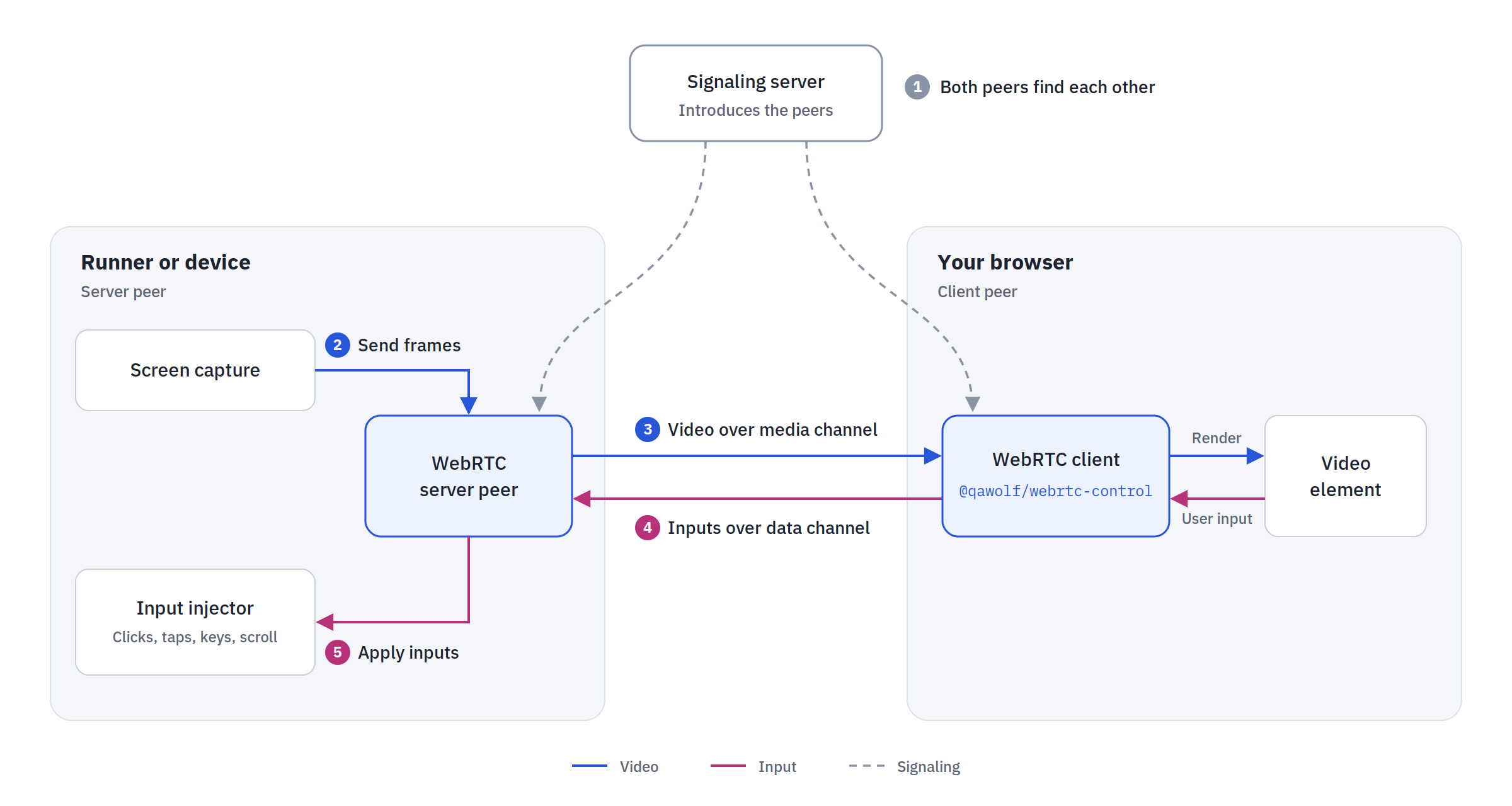
At its core, every live-streaming runner—web, Android, or iOS—has the same conceptual shape: a server side (inside the runner or device) that captures the screen and applies inputs, and a client side (in your browser) that renders the video and captures your clicks and taps. WebRTC connects the two, with a signaling step to introduce the peers and media + data channels to carry video one way and control inputs the other.
The catch is that each platform implements the "server" side completely differently. Capturing a Linux container's screen, an Android VM's screen, and a real iPhone's screen are three unrelated problems. The unification happens on the client: a single React component, @qawolf/webrtc-control (WebRtcScreenControl), is designed to render any of the stream sources — and they all have to feel live.
Step 1: Solve the latency problem
Live viewing wasn't new for us—we'd always let users watch the browser in a playground. The original implementation used VNC: TigerVNC plus websockify in each runner container, with the browser connecting through the noVNC library (an RFB—Remote Frame Buffer—client rendering frames into a DOM element).
VNC worked, but its ceilings all trace back to one root: it was built for reliable remote desktops, not real-time ones.
- Latency. VNC rides over WebSocket/TCP, and TCP's reliability guarantees—retransmits, in-order delivery, head-of-line blocking—are exactly the wrong trade for a live screen on an imperfect network. For real-time video you'd rather drop a frame than wait for it.
- Bandwidth. VNC ships raw pixel data, which scales badly as resolution and frame rate climb.
- Mobile. VNC streamed the whole desktop with the device as one part of it, which broke the inspector's coordinate math and felt clunky.
- No auto-reconnect. A noVNC
RFBinstance wraps exactly one session and can't auto-reconnect; recovery meant tearing it down and recreating it—untenable when there's no human to do it.
The replacement, WebRTC, is the same technology behind Google Meet, and it's purpose-built for the opposite priorities: low-latency peer-to-peer media over UDP, efficient video encoding (VP8/H.264) instead of raw pixels, and a bidirectional data channel for control. The payoff was a direct sub-200ms connection between your browser and the runner, with no middleman relaying every frame—so what you see is happening in real time—plus much better high-motion performance, a native fit for mobile, and a fast path for control input.
But that direct peer-to-peer connection is doing a lot of work—and it's what creates the next problem.
Step 2: Solve the discovery problem (signaling, STUN & TURN)
WebRTC being peer-to-peer is great for latency but introduces a discoverability problem: the two peers have to find each other and open a direct path. How hard that is depends entirely on where the other peer sits. When it's a local process—like the recorder consuming a run's stream over localhost—it's trivial: same machine, no NAT, nothing to traverse. But the moment a person watches, the far peer is their browser, out on the public internet behind their ISP's NAT—whether they're in a playground session or observing a live run. That's the case that takes real work.
Getting them connected is two steps. First they're introduced through signaling—a server (WebSocket on desktop/iOS, gRPC on Android) over which the peers negotiate how to connect. Then they have to actually reach each other across NATs:
- STUN tells a peer its own public IP and NAT type so the two can attempt a direct connection via hole-punching. We use Google's public STUN servers plus our own.
- TURN is the fallback when a direct connection can't be established (e.g. symmetric NATs): a relay with a publicly reachable IP that traffic flows through when hole-punching fails.
We run coturn (open-source STUN/TURN) on a dedicated cloud VM with a static IP; each peer reads an iceServers config to establish its connection. It lives on a VM rather than Kubernetes for two concrete reasons: TURN needs a wide UDP port range (e.g. 49152–65535) that Kubernetes load balancers don't support, and both peers in a session must land on the same coturn instance.
Step 3: Solve the cost problem
Efficient video costs CPU, and at our scale CPU is the whole game. Encoding video instead of shipping raw pixels is what makes WebRTC affordable on bandwidth—but it moves the cost to CPU, and that's where our scale bites us. A conferencing app encodes one stream on the user's own device. We encode thousands of concurrent streams on our own fleet, so the encoder's per-stream CPU cost is multiplied by our parallelism, and codec choice becomes a capacity question rather than a detail.
- VP8 was the starting point, but it's CPU-hungry.
- H.264 was added as a more efficient alternative: it supports hardware-accelerated and software-optimized modes, auto-detecting hardware acceleration and falling back to software, and even in software mode it was generally more CPU-efficient than VP8.
The catch: we have to decode our own stream. In a video call, H.264 only has to be decoded in one place—the viewer's browser, which already knows how. Our receiving end is a pipeline of automated consumers—the recorder, the screenshot processor, the AI agent—each of which has to decode the video itself, with no browser to lean on. The WebRTC libraries everyone builds on assume a browser is on the far end, so off the shelf they couldn't parse H.264 at all. Capturing the efficiency win meant forking the WebRTC library we build on and compiling in our own H.264 support so those headless consumers could read the stream. It's the mirror image of the encode-bill problem: every byte we save encoding, something on our side still has to decode—without a browser to do the work for us.
Three machines: OneControl to rule them all
QA Wolf supports testing web apps in a Linux container, Android apps in a virtualized device, and iOS apps on real iPhones and iPads—three completely different machines, with three completely different ways of getting pixels off the screen and inputs back onto it, and none of them share code. Yet from your seat in the browser, watching a web run and watching an iPhone run are supposed to feel like the same product: same player, same controls, same sub-200ms latency.
So the hard part here isn't proving the three sources are different—of course they are. It's making them look identical to one client without three divergent frontends drifting apart in parallel. First, how each source differs from the other two:
- Web / Desktop — the one we built entirely ourselves. Unlike the mobile sources, there's no off-the-shelf streaming server to lean on here—and we're not capturing "a browser window," we're capturing the Linux container's X11 display (which is why these are internally called "desktop" runners). We wrote it from scratch in Go: a WebSocket signaling service plus a "server" peer that does both screen capture and input injection over the X11 protocol—mouse, scroll, keys, even bidirectional clipboard—built on
pion/webrtcfor its feature coverage. It's the only source where we own every layer, which is why it absorbed the hardest build-vs-buy call (we evaluated Selkies-GStreamer, neko, LiveKit, Guacamole, and the RDP stacks; building something focused cost about the same as adapting any of them, while keeping us free to optimize). - Android — the one we mostly adopted. Android runs as a virtualized device under Cuttlefish (Google's KVM-accelerated Android distribution), which already ships a built-in WebRTC server any client can connect to. So unlike web and iOS, the win here was not building our own streaming—it was dropping the old VNC server and
websockifyand letting Cuttlefish stream a true full screen (which the element inspector depends on), at lower latency and better quality than before. Its one awkward difference from the other two: Cuttlefish negotiates over gRPC rather than WebSocket—the single biggest thing standing between us and a fully unified client. - iOS — the one on real hardware, and our first. iOS is the only source running on a real device rather than a VM or container, and it was actually our first custom WebRTC build—so it set the architectural pattern desktop later copied. It runs as an on-device broadcast extension using ReplayKit for capture, a WebSocket signaling server, a control channel for touch and keyboard, and a separate on-device agent that feeds the screen into WebRTC. Running on real hardware made it the hardest version of the problem, which is exactly why it became the reference design: a clean separation between screen capture, WebRTC handling, and input control that the other stacks could be bent toward.
How we unified them: OneControl
Left alone, those three stacks don't just differ on the server side—the client drifts too, and the client is the part users actually touch. Android leaned on Google's android-emulator-webrtc package (React-only, since archived, and unable to run in the Node.js environments headless automation needs); desktop and iOS spoke WebSocket while Android spoke gRPC. Three sources pulling three frontends in three directions is how you end up maintaining three products instead of one.
OneControl is how we collapsed that back to one. The resolution came down to three deliberate moves:
- One client, regardless of source. A single streaming/control component (
@qawolf/webrtc-control,WebRtcScreenControl) plus a shared control-logic core renders any of the three sources—so everything above it (the player, the element inspector, view-only mode) is written once and never has to know what's underneath. - Converge the outliers instead of rebuilding everything. We picked the iOS WebSocket pattern as the reference and reimplemented desktop from scratch to match it, putting two of the three sources onto a common signaling path rather than leaving each one bespoke.
- Adopt where adoption is already optimal. We explicitly scoped down rebuilding Android's WebRTC, since Cuttlefish's built-in streaming is already near-optimal and real Android devices weren't on the near-term roadmap. Unifying didn't mean forcing every source to be identical—it meant hiding the differences that remained (notably Android's gRPC signaling) behind the shared client, so callers never see them.
One pipeline, two consumers: streaming and recording
Adding the ability to live stream a run meant the same pipeline that was previously just recording the run needed to take on the second role. The obvious way to build that is two systems—one that streams, one that captures to disk. But that would…
- Double the CPU cost of encoding for zero added value.
- Double the number of video streams to capture.
- Cause drift between the stream and the recording.
So we built one—and WebRTC is what turned that into the easy path rather than the hard one. The trick is the same peer-to-peer property that was a liability before: the WebRTC sender neither knows nor cares who's on the receiving end. That indifference forced all the NAT-traversal work we discussed above, but here it's the gift.
Because the source captures and encodes a single track once and simply emits it, anything on the receiving end is just another consumer of bytes that already exist—so there's no second encode, no second capture path, and nothing that can fall out of sync (#3), because there's no second pipeline at all. And the same property pays off in the other direction: because each extra consumer costs almost nothing beyond a little added bandwidth, one encoded stream can fan out to several watchers at once—a whole team, plus our AI agent—all on the same run. Reaching that took some catch-up on our side: WebRTC handles many concurrent connections natively, but our runner's socket layer assumed a single client, so we added explicit multi-client support plus a view-only mode so an observer can watch without sending input. (Observation became its own workstream on a shared foundation—runner connectivity, auth, and the socket server—beneath several related features.)
So recording isn't a separate capture stack—it's the live pipeline with a different peer attached. When you're watching a run, the peer is your browser; when no one is, the peer is a local process whose only job is to consume the same stream and write it to disk—same frames, same encoding, same connection, different consumer. On web that's already how it works: the recorder consumes the same X11 display the runner is streaming, and on iOS a custom Go-based recorder does the same off the WebRTC peer. Android is the one source still converging on this—for now it records separately with adb screenrecord while live streaming runs as its own process, with the two set to fold together when we move to real Android devices. Where the recording is literally the stream with another peer on it, live view and saved video never fork into two codepaths that can drift apart—improve the pipeline and both improve at once.
E2E testing is a hostile environment by design
Getting a clean stream from one machine to another was difficult enough, but we also had to keep the whole operation standing in conditions that a conferencing app would treat as pathological:
The runner is unattended, and can die mid-stream
In our system, there’s no one sitting on either end to click reconnect, restart a wedged process, or even notice when something breaks.
One way this became a problem was if a run failed with an out-of-memory error. The runner didn't shut down gracefully—so the video artifact existed but was corrupted (never properly closed), and the UI kept showing a progress spinner as if it were still running.
The fix paired a near-term UI indicator (to distinguish out-of-memory failures from hangs) with longer-term work: adjusting ffmpeg to output partially-playable video and making the runner handle SIGTERM gracefully so artifacts close cleanly.
The software under test is expected to fail
What we stream isn't a person on a call—it's software we expect to fail, because catching that failure is the entire point. So the pipeline has to faithfully relay the states a conferencing app would never produce: a frozen UI, a blank screen, a crash mid-flow.
Those are precisely the moments worth watching, which means a stalled app can't be allowed to look like a dead stream—telling "the app is wedged" apart from "the runner died" is the same problem as the stale-spinner work above. It cuts the other way, too: a heavy or pathological app can bog down the very machine capturing and encoding it, with browsers wedging on data-heavy pages and the recorder straining on iframe-heavy ones. This is less a single fix than an ongoing discipline—keep the stream honest about whatever the app is really doing, even when that's nothing at all.
Streams will run over imperfect networks
Whoever's watching a stream might be on slow or flaky internet, and WebRTC's default UDP transport struggles there. After users on "Slow 4G" (~5 Mbps) reported streams that wouldn't connect at all, we added a TCP fallback—TCP/TLS ICE candidates—so the stream still connects and stays usable down to ~3G speeds. Once a slow connection is established, it tends to hold. Recovering from a connection that degrades mid-stream works on the live playground path, but is still a rough edge on the iOS recording path.
Conclusion
None of this is something a user ever sees. They open a run and watch it happen—and the whole achievement is that the WebRTC handshake, the TURN relay, the forked decoder reading our own H.264, the three unrelated capture stacks pretending to be one client, and the recorder quietly riding the same connection all stay out of sight. "Add a way to watch a run" turned out to mean hiding a real-time streaming stack behind a play button.
The reason it was hard was never the video itself—it was the conditions we run video in. The sender is unattended, the software under test is built to fail, the viewer is on a network we don't control, and every bit of it is multiplied by fleet scale, where a one-in-a-thousand glitch isn't an edge case but something happening to some run, somewhere, right now, with nobody there to catch it. The work was never getting a stream to play once; it was getting it to play every time, on its own.
And we're not done. Android still records on its own separate path, mid-stream recovery on iOS is still a rough edge, and keeping the stream honest about what a misbehaving app is really doing is more an ongoing discipline than a solved problem. But the part that matters is real: the run is no longer a black box you wait on. You can watch it unfold, step in before a hung flow burns to a timeout, and catch the exact moment something breaks—which, for a company whose entire job is catching the moment something breaks, turns out to be worth every layer underneath it.


