

- Cross-browser testing ensures your web app works consistently across browsers, devices, and operating systems.
- Without it, browser-specific bugs can break features or create inconsistent experiences for users.
- Testing every browser and device combination isn’t realistic.
- Focus instead on the browsers and environments your users actually rely on.
- Cross-browser testing matters most for legacy code, older browser support, and critical user workflows.
- These are the areas where browser differences are most likely to cause real problems.
- Most compatibility issues appear in a few predictable places.
- Common trouble spots include form inputs, CSS layout differences, mobile viewport behavior, device and permission APIs, and rendering differences across operating systems.
- Automation makes cross-browser testing easier to scale.
- Automated tests help teams validate important workflows across browsers without repeating the same manual checks.
Cross-browser testing verifies that a web application functions correctly and displays consistently across different web browsers, browser versions, operating systems, and devices. It ensures users have a reliable experience whether they access your site through Chrome, Firefox, Safari, Edge, or mobile browsers.
While modern browser standards like Interop and EcmaScript have reduced compatibility issues compared to the Browser Wars era, cross-browser testing remains essential for catching edge cases and ensuring a consistent user experience across all platforms. Testing “exhaustively” with 9,000+ devices, 12 popular operating systems, and three major browsers isn't feasible—even with dedicated cross-browser testing tools—but strategic testing of business-critical features can prevent costly bugs from reaching production.
When automated cross-browser testing is necessary
Not every application requires extensive cross-browser testing. Focus your efforts on three specific scenarios where browser compatibility issues are most likely to impact users and business outcomes.
1. Test legacy applications with outdated standards
While cross-browser differences can still appear even in modern code due to independent browser engine implementations, legacy applications are more likely to encounter compatibility issues because they're built on outdated code that predates modern web standards. These older codebases are more likely to encounter compatibility issues across browsers because they don't leverage standardized APIs and browser capabilities.
However, extensive cross-browser testing for legacy apps treats symptoms rather than the disease. The better long-term solution is refactoring and modernization. We know that refactoring can be a long, painful process. Many of our clients use QA Wolf to test the oldest parts of their application to avoid regressions while the team performs test-driven refactoring.
2. Support users on older browser versions
Cross-browser testing is essential when your users rely on older browsers because of strict software or OS upgrade restrictions. Industries like institutional banking, government agencies, education, healthcare, and non-profits often require support for browsers built before modern standards emerged.
Before the advent of browser standards, teams had to test for cross-browser compatibility because all browsers were completely different. These days, most browsers (about 75%) use the "guts" of either Google Chrome (e.g., Microsoft Edge, Opera, Brave). Most of the rest use Apple’s WebKit engine (Safari and all iOS browsers), with a small share using Firefox’s Gecko engine. But older browsers are more likely to expose cross-browser issues, specifically when those browsers encounter sites without sensible defaults, fallbacks, or graceful degradation.
If you have to support old browsers, you need at minimum a manual cross-browser testing approach. Use your analytics and create a curated target browser set to test on, preferably using your conversion rates. Scrub your analytics for bot traffic and set clear defect priorities so your team can focus on problems that actually matter. A majority of cross-browser defects are aesthetic and may not be noticeable to someone not deeply familiar with your company's style guide.
3. Prioritize business-critical features prone to browser differences
Given how easily the scope of automated cross-browser compatibility testing can increase, teams should limit themselves to testing business-critical features only. Does it look bad if your FAQ page is misaligned on some obscure browser? Yes. Is it worth the resources to test it multiple times across your entire set of target browsers? Probably not.
This is something your team can spot-check occasionally, manually. Cross-browser testing tools and services like QA Wolf have features that allow you to test on practically any browser/device/OS you need.
On the other hand, if you are developing a banking application, you risk losing customers if the application cannot process checks through the camera properly, so it behooves your team to test this regularly.
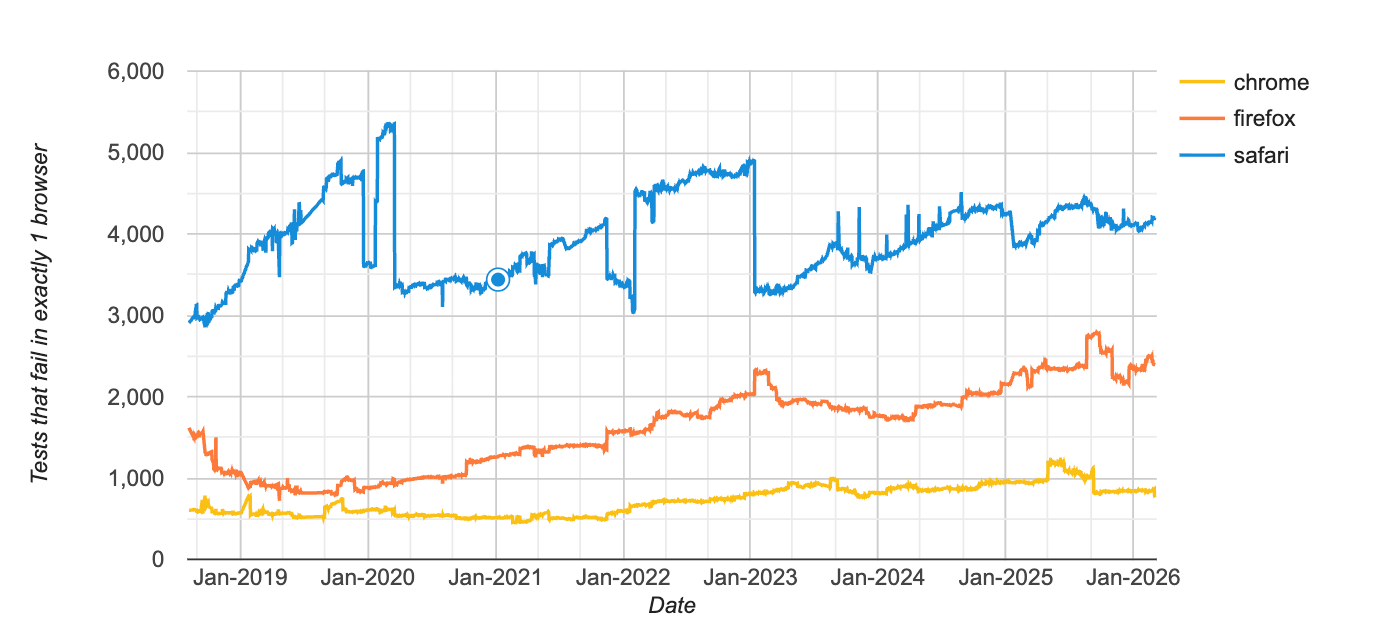
Focus your testing efforts on areas where browser, OS, or device fragmentation is known to cause defects.
Common cross-browser compatibility issues
Understanding where browsers differ most significantly helps you effectively target your testing efforts. Browser, operating system, and device fragmentation each create distinct compatibility challenges.
Browser-based fragmentation
The most common browser-specific issues include:
- Input type options: Input type options have different implementations across browsers, as do the autofocus attribute, textarea element, placeholder text, and form "validation" attributes. Usually, this does not have much impact, but it can be a good thing to check manually at least once.
- CSS layout behavior: Layout rendering can vary slightly across browser engines even when all browsers follow the same standards. Differences in how browsers handle flexbox sizing, sticky positioning, scroll snapping, and viewport units can cause elements to shift or render unexpectedly. These issues usually appear in more complex layouts, so it’s a good idea to check key pages and reusable UI components across your target browsers.
- Mobile viewport behavior: Mobile browsers dynamically adjust the visible viewport when address bars collapse or virtual keyboards appear. This can cause layout issues when using viewport units like vh, especially on iOS Safari where the browser UI changes size during scrolling. Test important pages on real mobile browsers to make sure headers, footers, and full-height elements behave correctly.
- Browser API differences: Applications that interact with device capabilities such as the camera, microphone, geolocation, or clipboard can encounter browser-specific restrictions. Some browsers require explicit user interaction before allowing access to these APIs, while others enforce stricter permission prompts or secure-context requirements. Make sure these interactions work consistently across the browsers and devices your users rely on.
Operating system fragmentation
OS-level differences primarily affect font rendering and media type support:
- Fonts: You can avoid this by using WebFonts.
- Unsupported media types: You can prevent problems by sticking with media types that are widely supported, where possible.
Device fragmentation
Device-specific issues center on API compatibility and performance variations:
- Hardware driver variation: This is more noticeable on Android since any phone manufacturer can use Android and configure it with any device driver they want. Some manufacturers don't test that drivers correctly respond to standardized device API calls. Test any part of your application that interacts with device input other than your keyboard and mouse (e.g., your microphone, camera, geolocation, or orientation).
- Performance: Especially where @keyframe is used or if your application uses hardware acceleration.
The primary thing you can do to prevent these defects is to keep your SDKs updated and select the correct calls once updated. Stay on top of the changes in the browsers and flag any areas of concern to those responsible for testing your application.
When to automate cross-browser testing
Automate cross-browser testing when it saves your company money in both the short and long term. Industry-wide wisdom says that you should automate repetitive tasks, but the more helpful answer is that automation makes financial sense when the cost of building and maintaining automated tests is less than the cost of manual testing or the risk of bugs reaching production.
Once your team has reviewed your codebase, browser usage, and fragmentation risks and has agreed on what workflows are worth testing on multiple browsers and device configurations, you can explore tooling or managed service solutions for cross-browser testing.
Cross-browser testing tools and services
After understanding what cross-browser testing is and when it's needed, the next question is whether to build this capability in-house, use a QA automation tool, or a managed QA automation service.
QA testing tools
QA testing tools provide the infrastructure needed to run automated tests across multiple browsers and devices without maintaining your own device lab. These platforms typically support parallel execution, CI/CD integration, and automated reporting, allowing teams to validate user flows across many browser combinations quickly.
QA Wolf offers an Agentic Automated Testing platform that generates production-grade Playwright and Appium tests from prompts. The platform explores your application, converts workflows into deterministic test code, and runs tests in parallel across environments while monitoring failures and suggesting fixes.
Managed QA automation services
Managed services provide end-to-end test strategy, implementation, maintenance, and reporting. Full-service providers handle everything from test creation to execution and failure investigation.
QA Wolf provides comprehensive cross-browser testing as part of their QA automation services. QA Wolf’s expert QA engineers use AI to build, maintain, and run end-to-end tests in parallel across browsers and environments. These services are best for teams without dedicated QA resources or those needing to scale quickly without building internal expertise.
Open-source automation frameworks
Frameworks like Selenium and Playwright form the foundation of most cross-browser automation. These tools give you full control over test implementation and can be paired with cloud platforms for broader device coverage.
Open-source frameworks are best for teams with strong engineering resources wanting maximum flexibility and control. However, they require significant investment in infrastructure, maintenance, and expertise to use effectively at scale.\
Automate cross-browser testing without managing the browser matrix
Automate cross-browser testing when the workflows matter and coverage grows. QA Wolf's Agentic Automated testing platform generates Playwright and Appium tests from prompts, then runs them in parallel across browsers, devices, and operating systems. Your team defines the critical workflows. QA Wolf executes them everywhere your users run your application.

What are the most common cross-browser compatibility issues?
The most common cross-browser issues include: input type implementations that vary across browsers, CSS layout differences, mobile viewport behavior, font rendering variations across operating systems, unsupported media types, and device API inconsistencies (especially on Android). Browser-based issues are most frequent, followed by OS and device-specific problems.
How do you choose which browsers and versions to test?
Start with your product analytics and build a curated "target browser set" based on real user traffic and business impact (e.g., conversion rate by browser). Remove bot traffic before making decisions, then include (1) your top desktop browsers, (2) your top mobile browsers/devices, and (3) any older browser versions you explicitly support due to customer constraints. This approach avoids testing thousands of combinations while still protecting revenue-critical user segments.
What are the best tools for cross-browser testing?
The best tools for cross-browser testing automatically run tests across multiple browsers, devices, and operating systems to catch browser-specific issues before they reach users.
QA Wolf generates automated Playwright and Appium tests that validate user workflows across browsers and environments. Teams can use QA Wolf’s Agentic Automated Testing tool to create and run cross-browser tests in CI/CD themselves, or choose our managed service where we build, execute, and maintain tests that ensure your application behaves consistently across browsers.
What are QA automation services for cross-browser testing?
QA automation services for cross-browser testing provide managed test coverage that detects browser-specific bugs before they reach production.
QA Wolf’s QA engineers build, run, and maintain automated cross-browser tests that validate critical user workflows across different browsers and environments. Tests run continuously, failures are investigated, and fixes are suggested to ensure your application delivers a consistent experience for every user.


