An end-to-end test suite lives and dies by the map of the application’s workflows. Too few tests leaves surfaces exposed for bugs. Too many tests create noise during a release. The wrong tests give you false confidence that your release is ready.
A good map isn't an inventory of an app's pages. It's the set of behaviors worth verifying, things like "Create, edit, and delete a user," "Filter search results by price," or "Check out with an expired card." The best maps are complete, correctly scoped, with nothing missing, and nothing superfluous.
For a human, identifying the right flows is fairly straightforward. But it’s time-consuming and, as development velocity increases with AI-driven code changes, impossible for many teams to keep up with. If engineering teams are going to catch bugs before they’re merged at the increased velocity, they need a way to automatically build and maintain an accurate map of a product’s workflows so the accompanying tests can be automated, updated, and deprecated as the product evolves.
It sounds like a simple task: give an agent a browser, let it click around, and turn what it sees into tests. There are multiple approaches to capturing those clicks. A computer-use agent can navigate an app and find surfaces on its own. A recorder can capture actual user paths. A spec-to-test system can translate requirements that someone who presumably knows the product already wrote down.
But capturing input, however you do it, doesn’t give you the full picture:
- Which objects in the product actually matter.
- Who's allowed to act on them.
- What's supposed to happen when someone does.
- Which of those outcomes are worth protecting with a test.
In this post we’ll walk you through the engineering of an agentic system that can accurately discover and outline valuable workflows. There was no single breakthrough. Improvements in speed and accuracy came from incremental improvements to prompts, models, architecture, inputs, and the way we measured success. Each change nudged us closer to an agentic system that could replicate the judgement of a human tester.
The requirements
What we wanted was to point an agent at a URL and have it come back with two things: 1) a structured representation of the app's pages and how they're reached, and 2) a test outline in the Arrange-Act-Assert (AAA) format ready for automation.
A few outcomes mattered from the start:
- Exploration had to be genuinely autonomous. The system needed to decide where to go as it learned the shape of the app, and be smart enough to know when to stop.
- Flows needed to be identified in real time. The user should be able to monitor the progress as the agent works, instead of getting a huge list dumped on them at the end.
- Most importantly: The agent had to produce a complete set of workflows without duplicates the first time; then keep track of changes over time and what human users had instructed the agent to disregard.
Our architecture
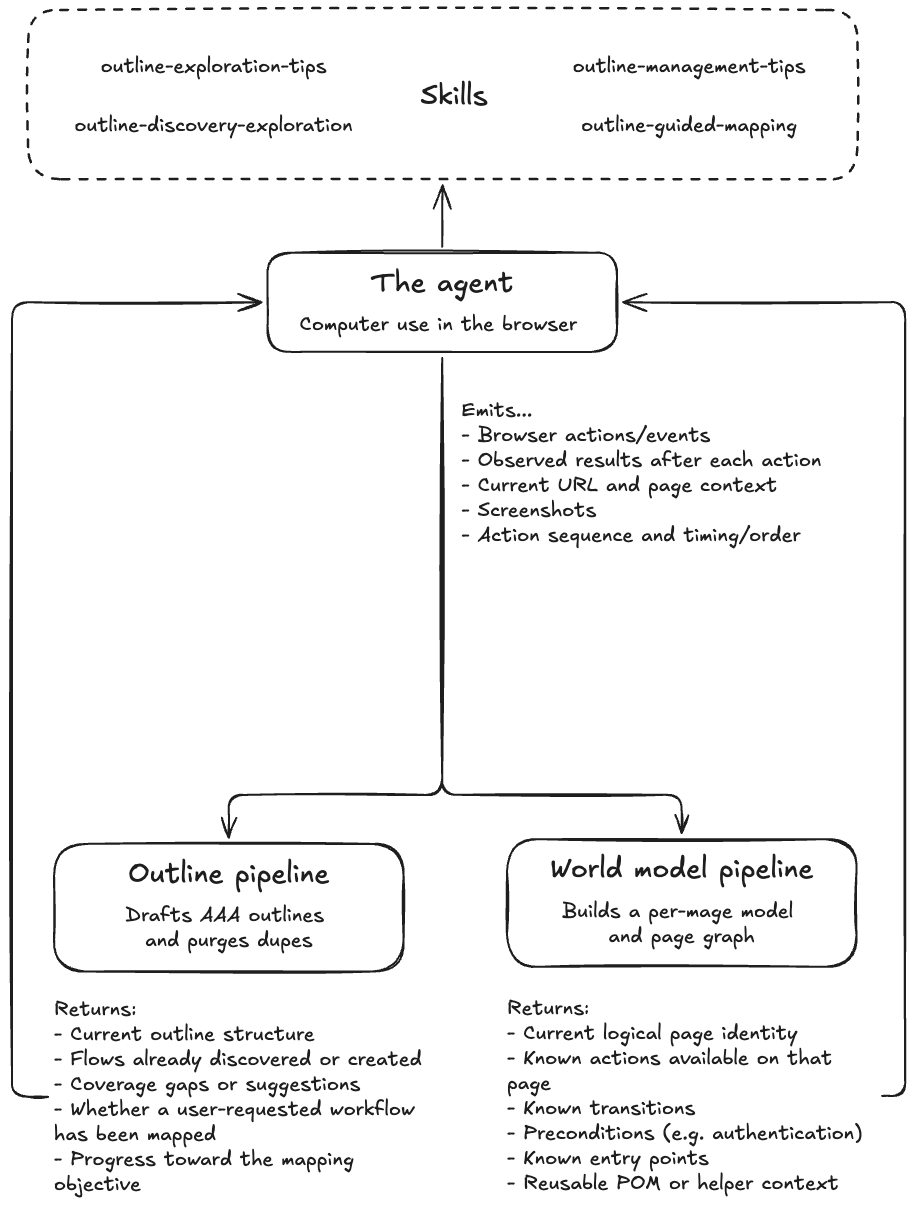
The whole system is a feedback loop, which starts with a single agent that explores a web app by computer-use. The agent handles its own orchestration according to what the user has asked it to do:
- Explore a product fully autonomously (called Discovery Mode)
- Explore a product guided by a static artifact like a test plan CSV (Static Guided Mode)
- Explore a product guided by a human conversation (Dynamic Guided Mode)
Rather than routing to separate specialized agents for each of these modes, it draws on skills (readable instructions it consults as needed).
Crucially, the agent doesn't write any of the test cases itself. It just navigates and emits a raw stream of events to two event-driven triggers:
- Outline pipeline has two jobs: Drafting new outlines from whatever actions the agent just explored; and periodically cleaning up the outlines by removing duplicates or low value test cases.
- World model pipeline builds a per-page model of what actions are possible, and a graph of how pages connect, ultimately rendered in Typescript as the Page Object Model.
The outline and world model are fed back to the agent/agent as it runs, so it explores with a running sense of what's already covered and how the app fits together.
Challenges we encountered
The above architecture is our Mapping AI as it exists today. What that diagram doesn't show is everything that broke, misfired, or failed on the way there. Getting an agent to think like a QA engineer meant working through a long list of failure modes. The gap between an LLM that can click around a web app and an agentic system that outlines all the possible test cases of a product is bigger than you might imagine.
Challenge 1: Measuring improvement
Like with any complex AI-driven task, the most important step is defining what improvement actually means. Speed and cost are obviously important but if the results weren’t accurate — meaning both useful and not hallucinated — then nothing else really matters.
Measuring how any given change improved the accuracy of the agent is what our training gym is for. The gym is a controlled environment where we run any version of the agent against a fixed set of tasks and score it consistently.
Within that gym, we define specific scenarios the agent has to complete. By measuring and tracking different scenarios we can zero-in on the core question: Did the change help the agent generate a large high-quality outline for a real site?
Because of the qualitative nature of that question, our scenarios mix two kinds of assertions:
- Judge-only scenarios are graded entirely by the LLM judge rather than something a regex can decide. For example, whether a flow is worth testing.
- Deterministic-only. Some things you can verify mechanically, with a line of code: no flows pointing at 404s or error pages, flow names kept concise, a minimum flow count, no duplicate flows, a valid folder structure. For these, we drop the judge in favor of mechanical checks.
Keeping the judge honest
Because the judge is itself an LLM, it would sometimes give a failing grade when the agent had done everything right; or it would give a pass even when the agent got it wrong.
Most of the trouble was the judge being too literal. Maybe it failed the agent because the code clicked "Log In" when the assertion expected "Login," or it decided that Playwright's fill() didn't count as "typing" an email. Or it would err the other way, and pass something it shouldn't have.
Turning up the judge’s reasoning by upgrading its model cut one whole class of flakes, but the more important breakthrough was simply cutting the LLM Judge out of the evaluation whenever possible and offloading as many checks as we could to a deterministic script. It wasn’t about side-stepping AI, it was about recognizing that an inherently flaky grader of an inherently flaky system would never produce a non-flaky result.
Challenge 2: Explaining what "a test worth running" actually means
Point an agent at an app with no constraints, and it writes down what it sees: "Open dropdown," "Display search bar," "Click hero banner.” It’ll outline all the ways one can navigate to the checkout page but it won’t check if the checkout page has the products in your cart.
That’s because an LLM exploring a screen has no innate theory of what's worth testing. Everything visible looks equally test-worthy. When you’re regression testing, you’re confirming a whole workflow and behavior still works. A good test has a goal in mind. The hard part was teaching the agent the difference between a behavior worth verifying and a thing that merely exists.
We couldn't write down every valid flow ahead of time, but we could define a flow by what it’s not.
Here’s an example of two of our rule prompts:
Rule 1: No non-interactive flows. Flows must not consist of a single non-interactive UI action, such as: displaying that content exists, navigating to a page, or viewing or browsing content.
Example flows to remove: "Display Search Dropdown," "View Hero Banner."
Rule 2: No navigation-as-a-test. Remove any flow or group whose name includes or implies navigation or accessing a page. A valid flow must describe what the user accomplishes after reaching a page, not the act of arriving.
Example flows to remove: "Navigate to Profile Page," "View Dashboard," "Browse Articles."
Challenge 3: Finding every important workflow
With huge improvements in what the agent considered a worthwhile flow, the next challenge was having it find all of them. Initially the agent would either stop too early (call a product fully mapped with whole corners of it still unvisited) or it would get stuck. On one test using Google Maps, it stalled on a Google sign-in screen, treating a login wall it didn't actually need to clear as a dead end instead of working around it.
So exploration needed policy rules for when to keep going, when to stop, and when to skip. We stopped letting the app's structure drive exploration and switched to goal-directed decisions with a two-phased approach, modeled on how a person tours an unfamiliar app.
Phase one is for breadth: the agent clicks into every top-level section to learn the shape of the product, queuing areas to return to.
Phase two goes deep, working through that queue and filling in the test cases inside each area. It keeps going until its “return to” queue is empty and around 200 tests have been outlined.
Getting that loop to behave took a series of specific corrections, each one designed to prevent the agent from a behavior that wasn’t useful:
- Click in, don't hover. One early session "finished" phase one in record time by hovering over each nav item instead of entering it. We forced the discovery pass to click into each section before marking it explored.
- Explore sections, not URLs. Given the freedom to type URLs as well as click, the agent started inventing plausible-looking addresses and generating 404 flows for pages that never existed. We restricted it to URLs it had actually discovered, added an explicit "URL navigation rules" block to the prompt, and reoriented it to explore sections rather than guess addresses.
- Steer toward the gaps. Instead of wandering uniformly, the agent keeps a running set of coverage suggestions and runs a gap analysis that points it at the lowest-coverage part of the outline next.
- Detect a stall and break out. If the feedback cycle described above goes several turns without any new destinations, an instruction tells the agent to change strategy and go elsewhere.
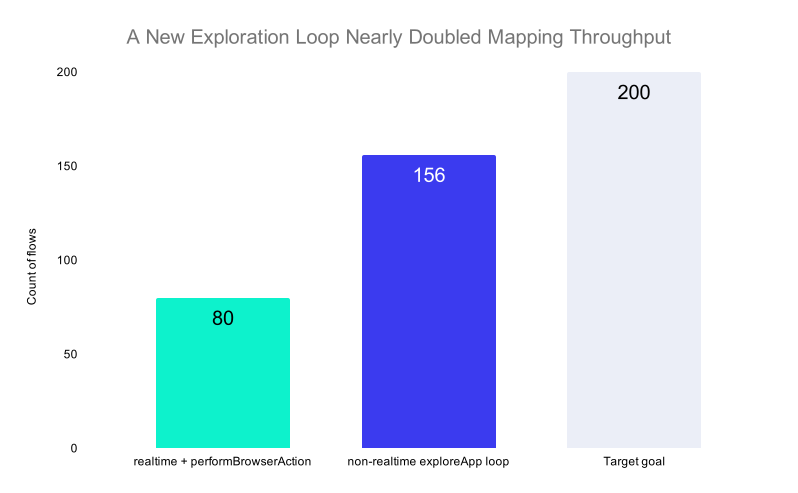
In making these changes we increased flows discovered by ~50% in a 15-minute window (95 → 143 on our standard mapping gym scenario), and doubled the number of flows found on one of our benchmark sites (~80 → ~156).
Challenge 4: Doing it faster than a fast human
Accuracy of the product map was our top priority but if it takes longer for an AI to accomplish what a human could do on their own, it’s not going to get much use.
When we profiled a mapping session end-to-end, we noticed where most of the time was going: looking around the product was only about 4% of the time; the model thinking took up about 96%.
Obviously the thinking time was where we had to focus our attention. Here’s what worked:
Decoupling exploration from outline-writing. Originally, the agent alternated between navigating the application and turning its latest observations into candidate flows. It couldn’t resume exploring until the outline step finished. We separated those jobs: a dedicated exploration loop now moves continuously through the application, while an independent background process watches the resulting browser events and updates the outline in parallel.
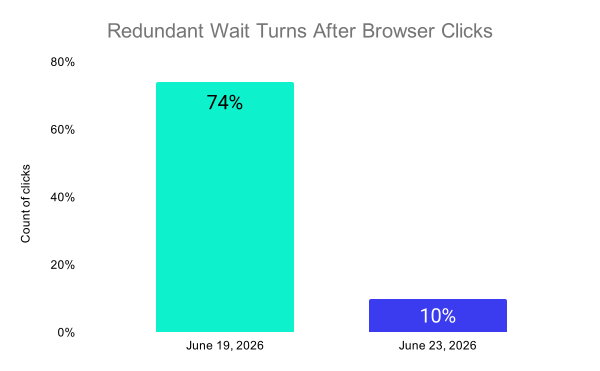
Eliminating wasted model turns. In about 74% of interactions, the agent burned an extra turn simply waiting for the page to settle before looking again. We reduced wasted turns to roughly 10% by creating flows in batches instead of writing them one at a time, giving the outline and cleanup steps direct shell access instead of making them delegate file changes, and reusing the latest screenshot when it was still current.
Challenge 5: Keeping the map accurate as the product changes
Everything up to this point builds a good map once. But a map begins to decay the moment it’s finished. Our research suggests that half of an automated test suite becomes obsolete within six months under a regular release schedule.
The naive way to keep a map current is to throw it out and start again. But the tests created from the original map accumulate valuable history: past results, failures, fixes, and ownership. Remapping the application and rewriting those tests from scratch would erase that context.
A remap shouldn’t replace the existing map. It should reconcile new observations with the coverage already there. Each candidate flow is assigned one of several durable states:
- Published: Existing coverage, along with its history.
- Draft: A new flow identified during the current mapping session.
- Rejected: A flow that was considered but ultimately excluded.
Genuinely new behaviors become draft flows. Candidates that match published or previously rejected flows remain connected to those earlier decisions.
Two mechanisms make that reconciliation trustworthy. First, conventional code—not an LLM—determines whether a candidate matches existing coverage. Second, the system preserves earlier rejection decisions and the reasons behind them. Remapping therefore doesn’t relitigate settled decisions or resurrect noise the team has already removed.
Wrapping up
Giving an agent a browser and letting it click around is the easy 4%. Getting it to think like a QA engineer so that it knows which behaviors are worth protecting, finds all of them, and keeps the map true as the product changes underneath it is the other 96% of the work. But it's also the part that determines whether you produce an artifact that’s actually useful or one that leaves out critical flows.
Our Mapping AI is so effective because of the accumulation of these small interventions designed to get it to behave more like a human engineer with judgment. To get here, we drew on our learnings from running over 100 million tests for companies like Figma, DoorDash, Drata, and Grafana, and we’re still continuously working to improve the quality and speed of our mapping.
As AI drives development velocity past the point where any team can map its workflows by hand, that judgment is exactly what has to be automated. It's the difference between a test suite that keeps up with the agentic SDLC and one that's already obsolete.