Key takeaways
Pick a framework that suits the app type and platform, not popularity.
- First, know what you’re testing: native, hybrid, or mobile-web/progressive web apps (PWAs). Then decide which platforms you need to support.
Appium remains the industry standard for cross-platform native and hybrid E2E testing.
- It offers the broadest coverage across Android and iOS, supports WebViews and system-level interactions, and holds up as test suites scale. This is why it remains the safest default for true mobile end-to-end automation.
Playwright is the superior choice for mobile-web apps and PWAs.
- It delivers fast, reliable testing with strong mobile emulation and modern debugging tools, allowing most teams to avoid the cost and complexity of real mobile devices.
Budget for ops, not the framework license.
- The hidden costs are device access, iOS constraints, CI parallelization, and keeping tests stable over time.
Mobile testing frameworks succeed or fail based on how well they support real product teams shipping real apps. Playwright handles mobile-web testing with fast execution, deterministic browser control, and predictable behavior in CI. For native apps, Appium paired with WebdriverIO gives teams direct access to iOS and Android behavior without forcing proprietary runners or opaque abstractions.
We evaluated the other common options before settling on our current approach. Playwright and Appium-backed WebdriverIO consistently held up under sustained use, integrated cleanly into JavaScript stacks, and matched how teams actually build, test, and release mobile software. That’s why we use them at QA Wolf.
This guide breaks down today's leading mobile testing frameworks—what they support, where they shine, and where they fall short—including critical factors like open-source status, hidden costs such as device access fees or additional tooling, and suitability for mobile-web testing.
Understanding mobile E2E testing frameworks: Gray-box vs. black-box
Before diving into specific tools, you need to understand the two fundamental approaches to mobile testing. This distinction determines how tests interact with your app and what they can access.
The frameworks in this article fall into two broad categories: gray-box and black-box. White-box frameworks are not for E2E testing because they only test small pieces of code in isolation and can't follow how a real user moves through the app.
What are gray-box testing frameworks?
Examples: Espresso, XCUITest, EarlGrey, Detox, integration_test
Gray-box frameworks run inside your app during testing. The test code is bundled into a special test build and launched alongside the app, so the two share memory and threads, including the main UI thread responsible for updating the interface and handling user input.
That setup gives the framework programmatic access to the app's internal state, which it uses to directly check things like whether a button is enabled, a background task is still running, or a screen has finished rendering. It does this without relying on what's on the screen.
Because gray-box tools run in the same process, they have direct access to the app lifecycle—the series of events the system uses to manage an app's state: launching, displaying UI, handling input, moving to the background, and more. Because of that, gray-box tools can automatically wait for the app to become idle before taking the next action. That synchronization helps prevent tests from failing due to timing issues.
What are black-box testing frameworks?
Examples: Appium, WebDriverIO, Maestro, UIAutomator2, Playwright
Black-box frameworks run outside the app. They don't share memory or threads with the app, nor have access to its internals. Black-box tools simulate user behavior by interacting with what's visibly drawn on the screen.
Because they can't observe internal activity, they rely entirely on what's shown to the user, making it harder to know when the app is fully loaded or ready. Developers who use them often have to add extra delays or retries to keep the tests stable.
Although black-box tools lack internal access, they offer something gray-box frameworks can't: system-level access. That means they can tap permission dialogs, open notifications, switch between apps, and interact with the operating system UI. They're essential for testing full user journeys across system boundaries—but they're more prone to timing issues when testing inside the app.
How to select a mobile testing framework
Selecting an automated testing framework for mobile comes down to some simple questions. If you’re still defining your overall approach to mobile automation and regression coverage, this guide to automated mobile app E2E regression testing breaks down how teams structure and scale mobile test suites before committing to specific tools.
Once you have that foundation, the actual framework choice is straightforward. Unlike the web app testing space, there are not many products out there, and a few simple questions will narrow your options to just one quickly. Use the decision tree below to find out what, if any, options you have.
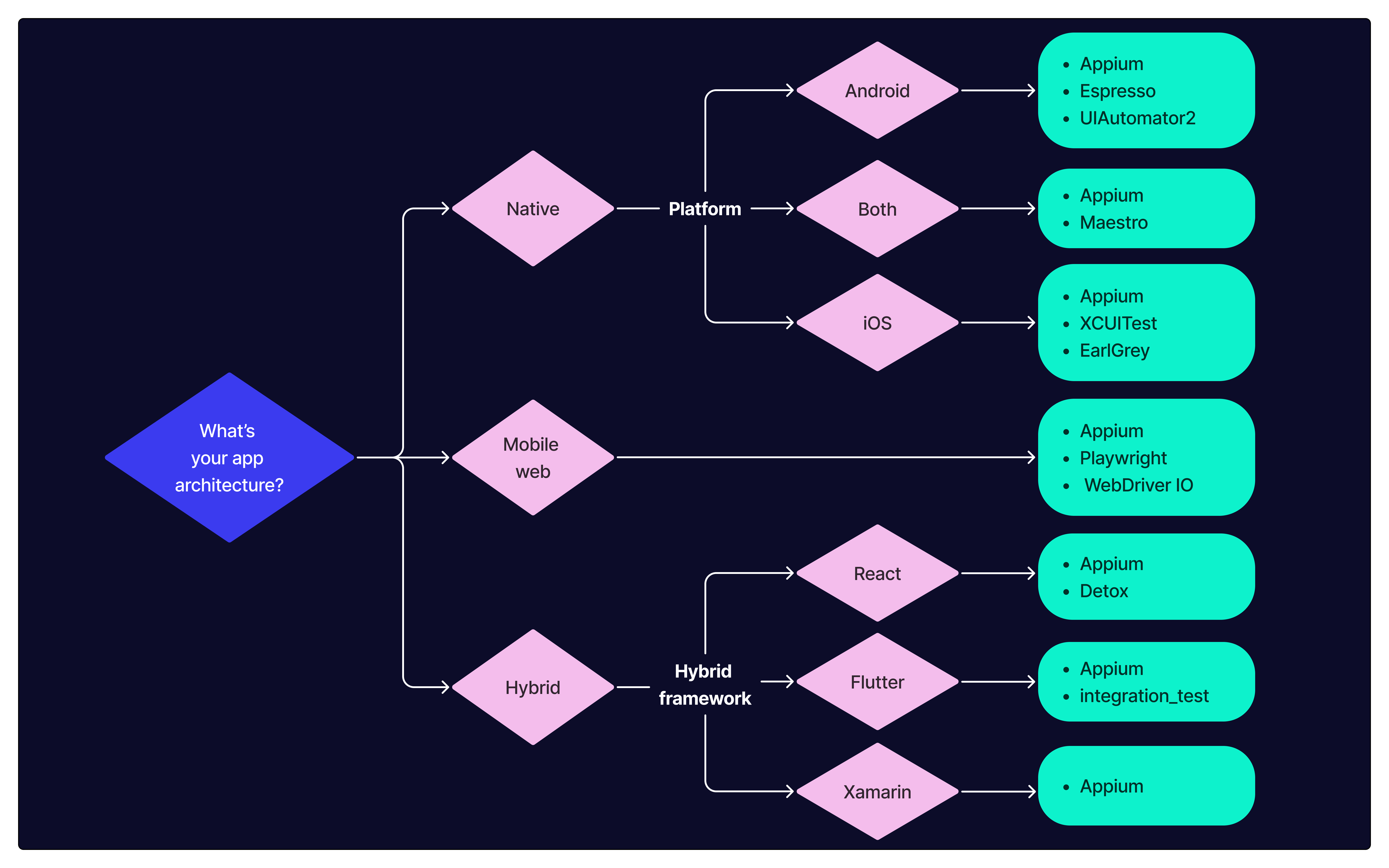
Step-by-step mobile framework selection process
Step 1: Determine your app type
- Native app
- Hybrid app
- Mobile-web app or PWA
Step 2: Identify your platform requirements
- Android only
- iOS only
- Cross-platform (both Android and iOS)
Step 3: Assess your team's technical capabilities
- Native mobile developers (Swift, Kotlin, Objective-C)
- JavaScript/TypeScript developers
- Non-technical testers or QA specialists
Step 4: Consider your testing scope
- In-app flows only
- System-level interactions (permissions, notifications)
- WebViews and hybrid content
- API and backend validation
Native app testing frameworks
These frameworks support a wide range of app types and platforms, making them all strong options for teams that need flexibility.
What are the frameworks for testing cross-platform native apps?
For teams building native apps that run on both Android and iOS, three frameworks dominate: Appium, WebdriverIO, and Maestro. Each takes a different approach to cross-platform testing, with distinct tradeoffs in flexibility, ease of use, and long-term scalability.
Appium
Appium is the de facto open-source standard for mobile automation. It wraps native automation frameworks (Espresso and XCUITest) in a WebDriver-compatible API, allowing tests to be written once and executed across Android, iOS, and Windows.
OSS: Apache 2.0
Category: Black box
Best for: Cross-platform native testing with system-level access and language flexibility for large-scale E2E automation
Cost considerations: Free for Android; For iOS, requires Mac developer license ($99/year per tester)
Strengths
- Cross-platform: Android, iOS, Windows
- Supports native, hybrid, and mobile-web apps
- Large community and plugin ecosystem
- Works with nearly any programming language
Weaknesses
- Slower than platform-native frameworks
- Can require heavy configuration to maintain test stability
- Less performant for animation-heavy or dynamic UI testing
- Requires a Mac developer license for iOS testing
WebdriverIO (with Appium integration)
WebdriverIO is a JavaScript/TypeScript test framework that simplifies working with Appium by wrapping it in a fluent, chainable syntax that's easier to read and maintain. It handles orchestration details like sessions, retries, and parallel runs, allowing teams to focus on writing expressive tests across browsers and mobile platforms.
OSS: MIT
Category: Black box
Best for: JS/TS teams extending web automation to mobile using Appium, with unified tooling and cleaner test orchestration
Cost considerations: Free for Android; For iOS, requires Mac developer license ($99/year per tester)
Strengths
- Strong JS/TS developer experience
- Tight integration with web and mobile automation
- Active community and plugins for test runners, reporters, etc.
Weaknesses
- Requires comfort with JavaScript tooling and ecosystem
- Requires a Mac developer license for iOS testing
- Limited to Chromium for web app testing
Maestro
Started in 2022, Maestro is a lightweight, declarative UI testing framework for Android and iOS. It uses YAML to define tests, making it language-agnostic and easy for developers and QA engineers to adopt. With features like screen assertions, gesture support, deep links, and built-in test recording, Maestro offers fast, reliable mobile E2E testing without the complexity of traditional code-based frameworks.
OSS: MIT
Category: Black box
Best for: Teams that want quick, stable UI tests across iOS and Android without writing code, especially when test flows are simple and developer time is limited
Cost considerations: Free; optional paid features via Maestro Cloud for hosted test orchestration
Strengths
- Cross-platform: Android and iOS
- Language-agnostic YAML syntax lowers the barrier to entry
- Supports gestures, deep links, screen validation, and reusable flows
- Real-time logs, visual diffs, and automatic screenshots improve test visibility
- Easy to set up and integrate into CI/CD pipelines
Weaknesses
- While branching and conditional logic are supported, extensive or logic-heavy tests can become harder to manage in YAML
- Debugging tools prioritize simplicity and visual clarity, which may feel limited to teams accustomed to IDE-based code debugging
- Smaller plugin and community ecosystem compared to long-standing frameworks
Which framework should you choose for cross-platform native apps?
If you're testing cross-platform native apps, the real choice is between Appium and Maestro. Appium will fit most situations and is the proven choice.
It's fully cross-platform and flexible enough to handle deep native flows, system dialogs, and WebViews. If you choose Appium, decide whether to use it directly or through WebdriverIO. Use WebdriverIO if your team's already deep in JavaScript and wants consistent tooling across web and mobile. Otherwise, vanilla Appium gives you more control and fewer abstractions to debug.
Maestro is fast, elegant, and avoids test code altogether—but it's still young, with a small community and limited track record. If you're testing simple flows and want low-flake results fast, it's worth exploring. Just know you're betting on an early-stage tool. If you expect to scale, integrate with custom systems, or support advanced test logic, Appium gives you more room to grow.
Key takeaway: If your goal is stable, scalable test coverage across Android and iOS, Appium is the safest and most capable choice. Use WebdriverIO if your team works in JavaScript and wants a smoother developer experience. Maestro is a good fit for teams that need quick results and have simple test flows, but it may not hold up as your app grows or your testing needs become more complex.
What are the frameworks for testing Android native apps?
For Android native testing, three frameworks matter. Espresso is designed for fast, in-app UI testing. UIAutomator2 is used for system-level interactions like permissions and notifications. Appium is the preferred framework for full end-to-end testing, exposing Android automation through a WebDriver-compatible interface without requiring teams to work directly with Espresso or UIAutomator2.
Espresso
Espresso is Google's official UI testing framework for Android. It runs in the app process, so it interacts directly with buttons, text fields, and UI events in a way tightly synced with the app lifecycle. Espresso synchronizes automatically by using the in-app process, reducing flakiness and avoiding timing issues during UI interaction.
OSS: Apache 2.0
Category: Gray box
Best for: Android teams testing in-app flows who want fast, stable, and fully synchronized UI tests with deep platform integration
Cost considerations: Free
Strengths
- Fast and reliable
- Deep access to Android internals
- Supported by Android Studio and Google CI tools
Weaknesses
- Android only
- Steep learning curve for non-Android devs
- Less suitable for full-stack teams without Android expertise
UIAutomator2
UIAutomator2 is Google's official system-level Android testing framework that works outside the app itself. Unlike Espresso, UIAutomator2 is a black box framework, so it sees the device more like a user does. That lets it interact with things like permission popups, notifications, and system settings, which Espresso can't do, making it useful for testing flows that involve other apps or operating system UI.
OSS: Apache 2.0
Category: Black box
Best for: Android teams testing system-level interactions on Android—like permission dialogs, notifications, and cross-app flows—outside the scope of in-app tools
Cost considerations: Free
Strengths
- Can interact with system dialogs, notifications, and other apps
- Useful for testing cross-app flows and OS-level behavior
- Available in Android SDK—no third-party setup required
Weaknesses
- Does not offer built-in synchronization with the app lifecycle, but this can be mitigated with custom polling or wait logic
- Less visibility into app internals compared to Espresso, since it operates at the system UI level
- Slightly slower and more sensitive to timing, though careful orchestration can minimize flakiness
- Best suited for testing system-level interactions and boundary cases—can be extended with supporting logic to cover broader scenarios when needed
Which framework should you choose for Android native apps?
If your goal is full end-to-end coverage on Android, Appium is the best framework. On Android, Appium drives the same underlying system automation as UIAutomator2 but exposes it through a standard WebDriver interface, which simplifies orchestration and avoids maintaining multiple test frameworks.
Espresso is a strong option when testing is limited to in-app flows. Because it runs inside the app, it has direct access to the UI and state and automatically waits for the UI to be ready before interacting, which makes tests fast and stable. Espresso can’t interact with system UI or other apps, so it can’t cover full user journeys on its own.
When Android tests need to cross system boundaries—such as handling permission dialogs or notifications—UIAutomator2 can fill that gap. It operates at the OS level but lacks Espresso’s built-in synchronization, so it typically requires custom waits. Some teams combine Espresso and UIAutomator2, but that split increases complexity and maintenance.
Key takeaway: If you need full E2E coverage on Android, Appium is the simpler, more complete choice. Espresso works well for fast, in-app validation, but it does not replace system-level testing. UIAutomator2 is best reserved for specific Android-only edge cases.
What are the best frameworks for testing iOS native apps?
For iOS native testing, XCUITest and EarlGrey provide the underlying in-app testing capabilities, both running inside the app with tight platform integration. Appium is the preferred framework for full end-to-end testing on iOS, exposing those native capabilities through a WebDriver-compatible interface that supports system-level interactions and consistent automation across environments.
XCUITest
XCUITest is Apple's native framework for iOS UI testing. Like Espresso, it runs within the app's process and integrates tightly with the platform. It's highly stable and widely adopted among iOS dev teams.
OSS: No—bundled with Xcode and maintained by Apple
Category: Gray box
Best for: iOS teams building native apps who want stable, high-speed UI tests with full platform integration and CI support
Cost considerations: Free for simulator testing; requires a Mac developer license ($99/year per tester) for real device testing
Strengths
- Native iOS support
- High stability and speed
- Fully supported in Xcode
- Preferred for App Store compliance testing
Weaknesses
- macOS only
- Can be harder to use for non-iOS developers
- Requires Apple hardware for local development
- Testers will need to pay for developer licenses
EarlGrey
EarlGrey is Google's official native testing framework for iOS. It works from inside the app, which means it can see and understand what the app is doing while tests run. EarlGrey automatically waits for things like animations or network calls to finish before taking the next step, which helps make tests more stable and less flaky. It's also the engine that powers Detox behind the scenes.
OSS: Apache 2.0
Category: Gray box
Best for: iOS teams that want Espresso-style control and tight UI synchronization, especially those from Android testing backgrounds
Cost considerations: Free; requires a Mac developer license ($99/year per tester) for real device testing
Strengths
- Tight integration with app internals for more reliable tests
- Automatic synchronization with UI run loop
- Faster execution than black-box tools
- Used in production by Google apps
Weaknesses
- iOS only
- Requires writing tests in Objective-C or Swift
- Smaller community than XCUITest or Appium
- Less friendly for cross-platform or JavaScript-based teams
Which framework should you choose for iOS native apps?
Appium is the right choice for end-to-end testing on iOS. By running outside the app and using XCUITest under the hood, Appium can exercise complete user flows that native in-process frameworks cannot reach.
XCUITest remains a solid option for fast, in-app UI validation with deep Xcode integration. Its scope is intentionally narrow, which makes it reliable but insufficient for full E2E testing.
EarlGrey provides tighter synchronization for in-app flows and mirrors Espresso’s model on iOS, but it shares the same limitation: it cannot test beyond the app boundary.
Key takeaway: Appium is the right choice when iOS tests need to model real user behavior across the operating system. Native frameworks excel at in-app validation but stop short of full E2E coverage.
Hybrid app testing frameworks
These tools are designed for teams building hybrid apps. Such teams often follow a "build once, deploy everywhere" (BODE) approach, prioritizing consistent visual behavior across multiple mobile operating systems.
What are the best frameworks for testing React Native apps?
Detox
Detox is explicitly built for React Native apps and runs tests from inside the app, giving it direct awareness of what the UI is doing. On iOS, it uses EarlGrey instead of XCUITest to support this behavior. Detox offers precise control over test timing and is well-suited for CI environments, but it requires native build access and can be complex to configure.
OSS: Apache 2.0
Category: Gray box
Best for: React Native teams prioritizing test speed and tight UI control during development and are comfortable maintaining separate platform configurations or limiting automation to one platform
Cost considerations: Free; requires a Mac developer license ($99/year per tester) for real device testing
Strengths
- Supports Android and iOS
- Built for React Native
- Smart sync model minimizes race conditions
- Active OSS development by Wix
Weaknesses
- React Native only
- Can be challenging to configure
- Smaller ecosystem compared to Appium
What are the best frameworks for testing Flutter apps?
integration_test
Released in 2021, Flutter's official E2E framework runs inside the app and uses Dart to script user interactions. As a gray-box tool, it syncs with the UI and waits for the app to settle before continuing, making tests more reliable.
OSS: BSD 3-Clause, part of Flutter repo
Category: Gray box
Best for: Flutter teams who want lightweight, in-process UI tests for basic flows and are fine staying within the Flutter runtime without testing system-level behavior or platform-specific features
Cost considerations: Free
Strengths
- Integrated into the Flutter ecosystem
- Maintained by the Flutter team
- CI-friendly
Weaknesses
- Flutter-only
- Less feature-rich than Appium or Espresso/XCUITest
- Smaller community for automation-specific issues
Which framework should you choose for hybrid apps?
If you're testing a hybrid app and need real E2E coverage across iOS and Android, Appium is the most reliable option. It's the only tool that can consistently automate WebViews, native UI, and system dialogs across both platforms. Yes, it comes with some overhead—but it works across frameworks, handles cross-platform test logic, and doesn't care whether your app was built in React Native, Flutter, Xamarin, or something else.
Detox is purpose-built for React Native and offers fast execution and clean syntax. But it requires native build hooks, breaks easily under CI load, and doesn't handle WebViews or system flows. It's a great dev-tool-level tester, but not built for E2E at scale.
Likewise, for Flutter testers, integration_test is fine for UI checks and widget flows, but it can't simulate real-world behavior or interact with anything outside the app. You can patch around it—but that's on you.
Xamarin never had a strong testing tool. Currently, most Xamarin teams doing mobile testing fall back to Appium—not because it's ideal, but because it's the only tool that supports what they need.
Key takeaway: If you're building a hybrid app and need cross-platform, black-box automation that works at scale, Appium is the framework everything else gets compared to and eventually replaced by.
Mobile-web app testing frameworks
Not all mobile apps are native or hybrid—many teams build mobile-first web apps or Progressive Web Apps (PWAs). For those teams, a browser-based E2E tool will do the job if you don't have use cases requiring real devices.
Can I use Playwright for mobile app testing?
Playwright is a modern, high-speed web testing tool from Microsoft that supports real mobile browser emulation for Android devices (including device metrics, touch input, and geolocation) and simulates iOS viewports. While it doesn't support native app testing, it's excellent for PWAs and responsive mobile UIs.
OSS: Apache 2.0
Category: Black box
Best for: Teams testing mobile-web apps or PWAs who want fast, reliable browser automation with mobile emulation—no real devices required
Cost considerations: Free; optional paid testing infrastructure via Microsoft and third-party vendors
Strengths
- Excellent built-in mobile browser emulation (Android, iOS viewports, geolocation, touch, etc.)
- Supports Chromium, Firefox, and WebKit—enabling cross-browser testing, including Safari-like behavior
- Fast execution with auto-waiting and built-in test isolation
- Built-in trace viewer, video recording, and network mocking for powerful debugging
- Headless and headed modes; integrates easily into CI/CD pipelines
Weaknesses
- Does not support real devices or native/hybrid app testing
- Some mobile-web emulation features may differ slightly from behavior on physical devices
- Emulation is limited to Chromium
Which framework should you choose for mobile-web apps?
Playwright is the strongest option by far if you're testing mobile-web apps. It supports mobile viewport emulation, touch events, geolocation, network throttling, and even WebKit-based rendering for Safari testing—all from a single test suite. You get fast, reliable feedback with realistic browser behavior, without needing real devices or device farms. For 90% of mobile-web E2E testing, this is where you start—and often, where you stop.
However, if you need to run tests in real mobile browsers—for example, validating login flows in Safari on iOS or testing geolocation in Chrome on Android—you'll need to move to Appium. It's slower and heavier, but can drive real mobile browsers on real or virtual devices. That matters for things like camera permissions, push notifications, or any behavior tightly coupled to mobile OS behavior.
WebdriverIO also fits here—if you already use it for desktop automation. It can launch mobile browsers in emulated environments or device farms with the proper configuration and infrastructure. But out of the box, it lacks mobile-specific APIs and touch handling, and you'll need to bring your own emulation or real device layer. It's doable. It's just not built to do that out of the box like Playwright is.
Key takeaway: Use Playwright for mobile-web automation unless you have a reason not to. Move to Appium when you need real device fidelity. Use WebdriverIO only if you're already deeply invested in WebDriver tooling and are averse to using multiple frameworks.
Frequently asked questions
How do I test a mobile app?
Use a framework that matches your app type: Appium for cross-platform native apps, Espresso for Android, XCUITest for iOS, or Playwright for mobile web apps and PWAs.
What’s the best framework for mobile app testing?
There is no single best framework for all mobile apps. The right choice depends on what you are testing.
- For mobile web apps and PWAs, Playwright is the strongest option. It provides fast execution, deterministic browser behavior, and predictable CI runs without requiring real devices or proprietary infrastructure.
- For native mobile apps, Appium is the most reliable default. Paired with WebdriverIO, it supports full end-to-end testing across iOS and Android, including system-level interactions, using open, WebDriver-based APIs instead of closed runners or opaque abstractions.
- For mobile web apps and PWAs, Playwright is the strongest option. It provides fast execution, deterministic browser behavior, and predictable CI runs without requiring real devices or proprietary infrastructure.
What’s the difference between gray-box and black-box mobile testing frameworks, and why does it matter?
Gray-box frameworks (Espresso, XCUITest, Detox, integration_test) run inside the app process. They can observe internal state and automatically wait for the UI to become idle, which makes them fast and stable for in-app flows. Their limitation is scope—they cannot interact with system UI or other apps.
Black-box frameworks (Appium, WebdriverIO, Maestro, UIAutomator2, Playwright) run outside the app and interact with what’s rendered on screen. This allows them to automate system dialogs, notifications, and cross-app flows. The tradeoff is that they rely on explicit waits and careful orchestration to stay stable.
This distinction determines whether your tests can cover full end-to-end user journeys or only in-app behavior.
What hidden costs should I expect when setting up mobile test automation?
Most frameworks are free, but costs show up in execution and maintenance:
- iOS testing requires an Apple Developer Program membership ($99/year per tester) for real devices.
- Device access through cloud farms can add ongoing monthly fees.
- CI infrastructure becomes significant as suites grow and parallelism increases.
- Engineering time is often the largest cost, especially for black-box tools that require explicit waits, retries, and careful state management.
Android emulator testing can start at $0. iOS real-device testing almost always adds both licensing and hardware or device-farm costs.